
Know Exactly What's In Stock — And What to Order Next
Technical cards, automatic write-offs, and real-time stock control built into your POS
Build a technical card for every product, link it to raw materials, and SmartOn writes off the exact quantities automatically on every sale. See live stock levels, get notified before you run out, and even stop overselling automatically.
Free demo available
Two connected modules
Materials and Inventory Aren't the Same Thing
Materials
The ingredients used in your recipes — butter, salt, eggs, flour. Linked to technical cards and automatically written off with every sale — through the POS or an invoice.
e.g. butter, salt, eggs, flour
Inventory
Reusable equipment and assets — plates, forks, knives, spoons. Tracked and counted, but not linked to recipes or written off automatically on sale.
e.g. plates, forks, knives, spoons
Technical card
Every Dish, With Its Own Recipe and Cost
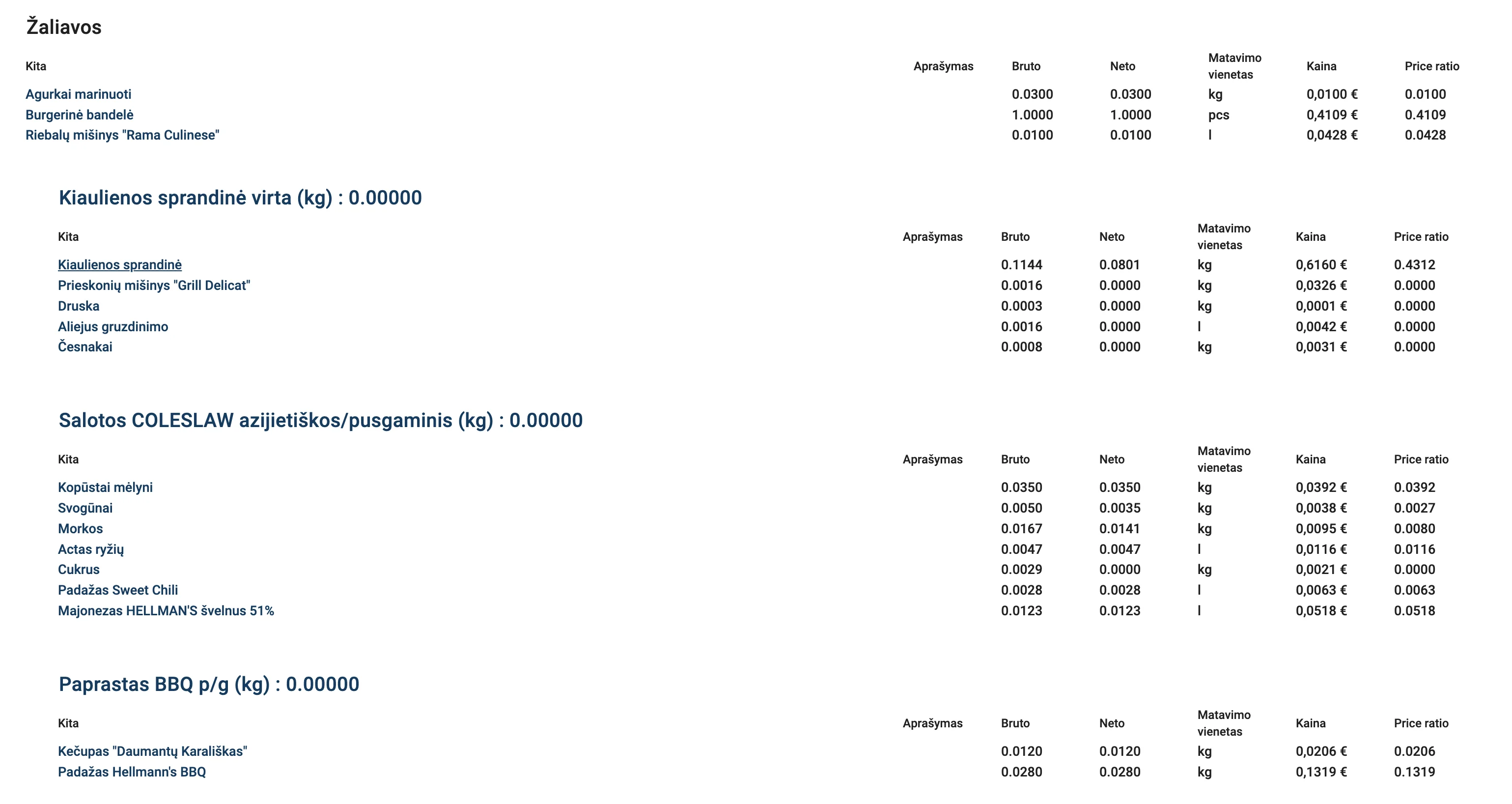
Describe the raw materials, weight, and quantity — SmartOn automatically calculates the dish's cost and deducts exactly the right amount of materials on every sale.
- Gross and net quantities for every ingredient
- Automatic cost calculation
- Nested recipes — a recipe within a recipe
- Allergens visible to waiters in the POS
For the kitchen
A Printed Card — Exactly How to Prepare the Dish
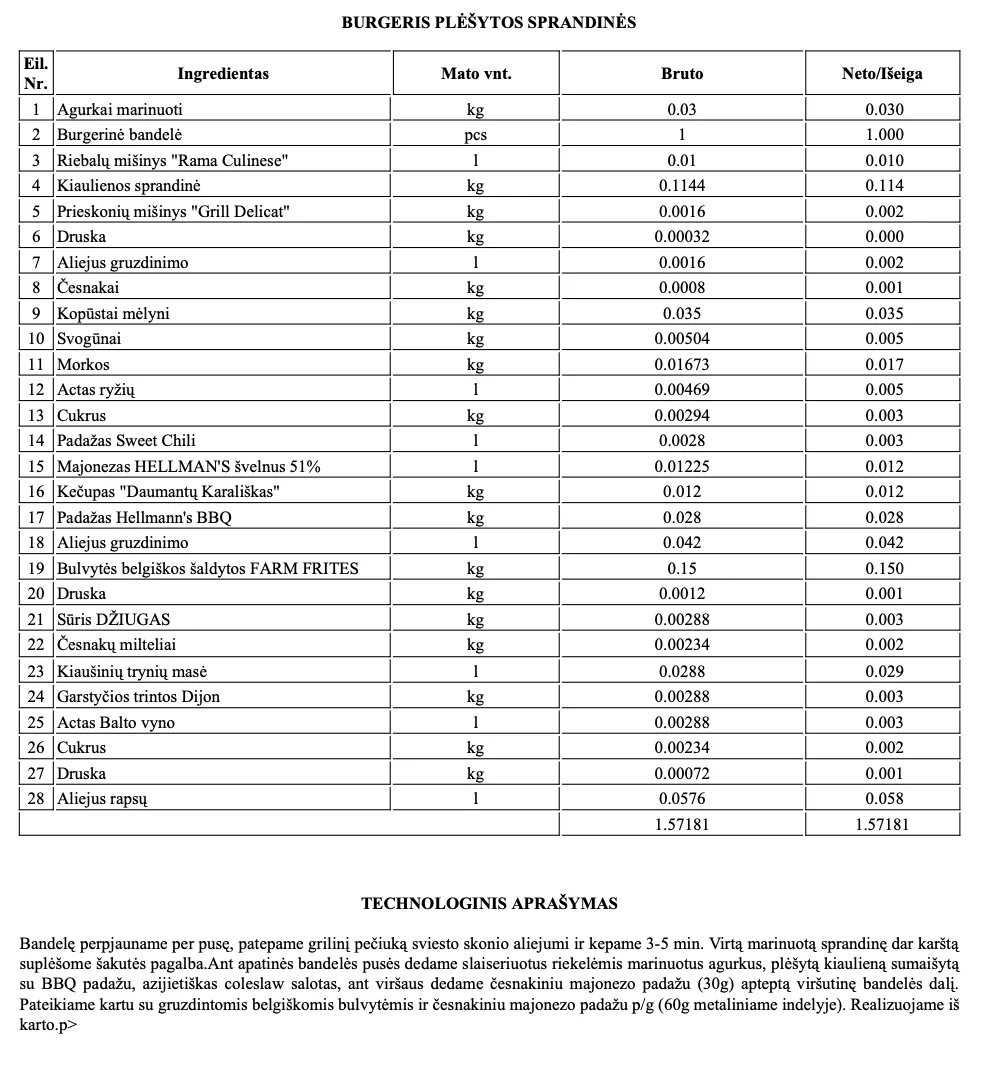
Generate a printable technical card with the full ingredient list and preparation method — so kitchen staff prepare the dish exactly the same way, every time.
- Full ingredient list with gross and net quantities
- Step-by-step preparation instructions
- Great for training new kitchen staff
- The same card — consistent quality across every location
Real-time stock
Every Item, Every Location — One Table
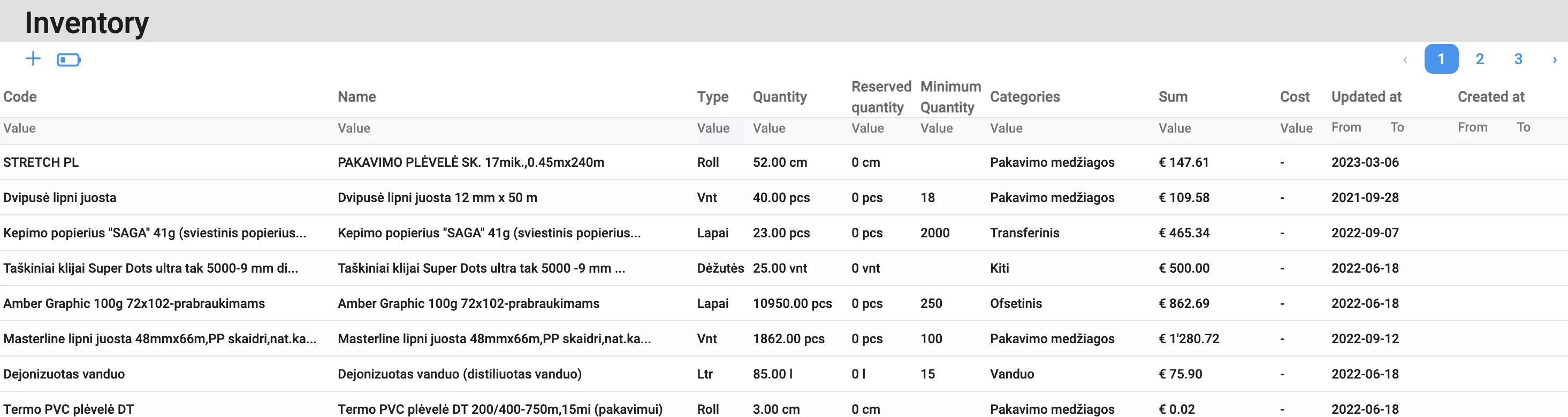
Stock levels, reserved quantities, and minimum thresholds — always accurate, because they update automatically with every sale, purchase, or write-off.
- Stock, reserved, and minimum quantity for every item
- Alert the moment stock drops below the minimum
- Setting to block sales when materials are insufficient
- Full movement history — purchase, production, write-off
How it works
From technical card to reorder — in four steps.
Create a technical card
Link a menu item to its raw materials and exact quantities.
Sell it — POS or invoice
Every sale, whether through the POS or an invoice from the back-office, automatically deducts the linked materials from stock.
Get notified
SmartOn alerts you when stock drops below your minimum level.
Order and restock
Reorder exactly what's needed — no more guesswork or last-minute runs.
Everything You Need to Manage Stock
Built into SmartOn POS and ERP — no separate software needed.
Technical Cards for Every Product
Build a recipe card linking each menu item to the exact raw materials and quantities it uses — the foundation for automatic write-offs and accurate costing.
Automatic Write-Off on Every Sale
Whether you sell through the POS or write an invoice straight from the back-office, linked materials are deducted automatically either way — no manual stock adjustments, no end-of-day guesswork.
Real-Time Stock Levels
See exactly what's left, and what needs reordering, updated live as sales come in — across every location.
Printable Kitchen Cards
Generate a printable technical card for the kitchen, showing exactly how each dish is made — consistent quality, every time.
Allergen Info at the POS
Waiters can pull up the technical card on the till to instantly check allergens before a dish reaches the table.
Low-Stock Alerts & Oversell Protection
Get notified the moment stock drops below your minimum — and optionally block the sale of items you don't have enough materials to make.
Stocktaking
Faster Stocktaking, Right From Your Phone
Run a full stocktake without spreadsheets — for both materials and inventory. Scan a barcode with your phone camera, or search and type the counted quantity — SmartOn compares it against expected stock and flags the differences instantly.
- Scan barcodes with your phone camera — no separate scanner needed
- Search and enter counted quantities manually
- Instant comparison against expected stock levels
- Discrepancies logged automatically for review
- Works for both materials and inventory items
- Can also be run retroactively, for a past date
Nothing to worry about — you can run the stocktake for a past date instead. SmartOn accurately recalculates what quantities should have been at that exact date and time, based on the full history of purchases, sales, and write-offs.

Ready to manage stock without the guesswork?
Set up technical cards and let SmartOn write off materials for you.
Free demo available